
NLQ lets people ask business data questions in everyday language. The difficult part is not turning a sentence into SQL, but interpreting metrics, permissions and context well enough to return a trustworthy answer.

Aucun heading trouvé dans #cible
A natural language query, or NLQ, is a question written in everyday language that asks a data system to find, filter, calculate or analyze information. A user might type “What was revenue by region last quarter?” instead of writing SQL or navigating a dashboard. The interface feels simple. The system behind it is not.
Reliable natural language querying has to understand the question, map business language to the right metrics and dimensions, respect permissions, generate or plan the underlying query, validate the result and return an answer the user can understand. That is why production NLQ is better understood as a governed analytics workflow than as a chat box placed in front of a database.
What does natural language query mean in analytics?
In analytics, NLQ describes the way a person expresses a request. The request is written or spoken in normal language instead of a formal query language. The system then translates that intent into operations that the underlying data platform can execute.
The distinction matters because NLQ is the interface, not necessarily the execution method. One platform may translate a question into SQL. Another may use a semantic query language, an API, a search layer or several tools. The user experience can look similar even when the architecture underneath is very different.
This also explains why NLQ is broader than text to SQL. A natural language question can lead to SQL, but it can also lead to a governed metric request, a search operation, a chart, an explanation or a sequence of analytical steps.
For the narrower database translation problem, see text to SQL. For workflows that continue beyond one question, see agentic analytics.
A simple natural language query example
Imagine a finance leader asks:
A trustworthy NLQ system cannot simply look for columns containing the words “gross”, “margin”, “France” and “month”. It needs to know what gross margin means in this company, which date definition is used, which geography field represents France, whether the user can access the underlying rows and what comparison period makes the question meaningful.
The visible question is one sentence. The analytical interpretation may depend on a much richer model of the business.
How does natural language querying work?
Modern systems differ in implementation, but a production workflow usually contains several distinct stages.
Interpret the request. The system identifies the user’s intent, entities, measures, dimensions, filters and time references.
Resolve business meaning. Terms such as revenue, active customer or churn need to map to governed definitions rather than whatever column name appears closest to the wording.
Apply identity and permissions. The user should only be able to query the data and metrics that the surrounding platform authorizes.
Build an executable query plan. Depending on the architecture, the system may generate SQL, call a semantic layer, invoke an API or combine several tools.
Validate and execute. The system checks whether the request is valid and safe before running it against the relevant data source.
Return an understandable answer. The final output may be a number, table, chart, explanation or a follow up analytical question.

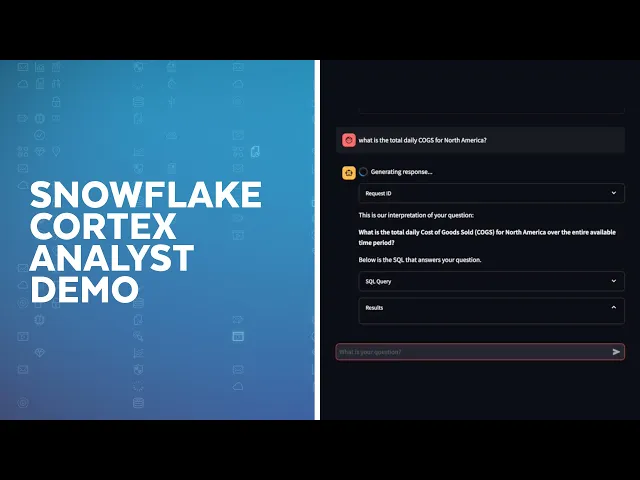
Current enterprise implementations illustrate this architecture clearly. Snowflake, for example, documents a natural language analytics workflow in which a question is interpreted through a semantic model before a query is generated. Its documentation explicitly describes the semantic model as the mechanism that connects business terminology with structured data. Snowflake’s Cortex Analyst documentation is one concrete example of this pattern.
NLQ, NLP, NLU, text to SQL and conversational BI are not the same thing
These terms are often used together, which creates unnecessary confusion. They describe different layers of the experience.
Concept | What it describes | Example |
|---|---|---|
Natural language query | The user expresses a data request in everyday language. | “Show revenue by region last quarter.” |
NLP | The broader field that lets software process human language. | Parsing words, grammar and context. |
NLU | The interpretation of meaning and intent within language. | Understanding that “margin” refers to a specific business metric. |
Text to SQL | One execution method that converts natural language into SQL. | Turning the revenue question into a database query. |
Conversational BI | A broader analytical experience built around dialogue and follow up questions. | Ask, answer, refine, compare and visualize in a conversation. |
Agentic analytics | An agent performs analytical work across multiple steps or over time. | Monitor a KPI, investigate a change and deliver an explanation. |
This distinction helps avoid a common architectural mistake: assuming that better language generation automatically creates better analytics. The language model can interpret a sentence fluently while still selecting the wrong metric, join path, time window or permission context.
Why a semantic layer matters for enterprise NLQ
The most difficult enterprise questions are rarely difficult because of grammar. They are difficult because business terms are ambiguous.
“Revenue” may mean booked revenue, recognized revenue, net revenue or a specific finance definition. “Customer” may refer to an account, a billing entity or an active subscription. “Last quarter” may follow a calendar year or a fiscal calendar.
A semantic layer gives the NLQ system governed business context. It can define metrics, dimensions, relationships, synonyms and access rules so the system does not have to infer critical business logic from raw schemas every time a user asks a question.
This is why several current NLQ architectures emphasize semantics. AtScale describes semantic layers as a way to standardize terminology and improve NLQ accuracy. Snowflake uses semantic models and semantic views to map business language to structured data before generating queries. These approaches differ in implementation, but the design principle is the same: reliable natural language analytics needs more than a powerful model.
Source : Snowflake Developers, official YouTube channel
What can users ask with NLQ?
The best way to understand natural language querying is to look at the business questions it can support. The exact scope depends on the quality of the data model and the capabilities of the platform.
Team | Natural language question | What the system has to understand |
|---|---|---|
Finance | “Which cost categories explain the variance against budget this month?” | Budget definition, actuals, variance calculation, month, category hierarchy and access rules. |
Sales | “Which enterprise opportunities are most likely to miss the quarter?” | Opportunity stage, enterprise segment, close date, forecast logic and current pipeline state. |
Operations | “Where did fulfillment time increase the most this week?” | Fulfillment metric, weekly period, locations, comparison baseline and operational dimensions. |
Product | “How did feature adoption change after the latest release?” | Feature event, eligible users, release date, adoption metric and comparison cohort. |
Simple questions can often be answered in one query. More ambiguous questions may require clarification, several queries or a deeper analytical workflow. A good system should know when it has enough context and when it needs the user to clarify the request.
Where natural language query creates the most value
NLQ is most useful when people know the business question but do not want the mechanics of querying data to become the bottleneck.
It can reduce repetitive requests to data teams, make ad hoc exploration more accessible and shorten the distance between a question and the first evidence. It is especially effective for well defined metrics, common dimensions and analytical patterns that repeat across teams.
NLQ can also improve the usability of existing BI environments. A dashboard is excellent when the question was anticipated in advance. Natural language querying becomes useful when the next question was not.
That does not mean every complex analysis should become self service. Analysts still add value when the problem requires new modeling, causal reasoning, experimental design, domain judgment or investigation across weak and incomplete evidence.
Where NLQ fails
A natural language interface can make a weak data foundation look deceptively easy to use. That is one of the biggest risks.
The system may return a syntactically valid query that answers the wrong business question. It may choose the wrong metric, join incompatible tables, misunderstand an ambiguous date, expose data the user should not see or confidently summarize a result that has not been validated.
The main failure modes are therefore not limited to language understanding. They include semantic errors, data quality problems, permission failures, invalid query logic and misleading explanations.
This is also where the strongest current competitors in the SERP increasingly converge. The better NLQ guides now discuss semantic models and governance rather than presenting natural language as a magical replacement for SQL. A useful enterprise guide has to go one step further and explain how those controls are evaluated in production.
How should enterprise NLQ be secured?
The language model should never be the authority that decides which rows, tables or systems a person may access.
Permissions should be enforced by the surrounding data and application architecture. Depending on the sensitivity of the workflow, useful controls can include role based access, row level security, read only execution, query limits, restricted schemas, audit logs and explicit review before high impact actions.
Security also applies to the generated query itself. Research on secure text to SQL systems has explored architectures that inspect both the user request and the generated database query before execution. The principle is useful even when the exact implementation differs: generated code should be treated as an output that can be validated, not as something that is automatically safe because it came from an AI model.
For a technical example of this approach, see the Cambridge research on security in text to SQL systems.
How do you evaluate NLQ quality?
A successful query is not simply one that runs without a syntax error.
Business correctness matters more. Did the system choose the right metric? Did it understand the requested population? Did it apply the correct date range? Did it respect access rules? Can a user understand where the answer came from?
A practical evaluation program should test several dimensions together: interpretation accuracy, query correctness, answer correctness, permission compliance, traceability, latency and the system’s ability to handle ambiguity.
Teams should also maintain representative questions from real users. A benchmark built only from clean demonstration prompts will overestimate how well the system performs once people start using abbreviations, internal vocabulary and incomplete questions.
Snowflake’s Verified Query Repository is one example of a production technique that connects natural language questions to validated query patterns. The implementation is vendor specific, but the broader lesson is portable: verified examples and feedback loops can improve trust in recurring analytical questions.
Does NLQ replace dashboards or data analysts?
Usually, no.
Dashboards remain useful for stable monitoring, shared KPIs and recurring views. NLQ is better suited to exploration when the user has a question that the dashboard did not anticipate.
Data analysts remain essential for difficult analytical work, especially when the problem requires new models, deeper investigation or judgment about incomplete evidence. NLQ can remove repetitive retrieval work and accelerate first pass analysis, but it does not eliminate the need for analytical expertise.
The strongest operating model is often complementary: dashboards for known monitoring needs, NLQ for ad hoc questions and analytical agents for workflows that need to continue across multiple steps.
Where NLQ stops and agentic analytics begins
A natural language query starts with a user asking a question. An analytical agent can go further.
Suppose a user asks, “Why did conversion fall yesterday?” NLQ can help interpret the request and retrieve relevant data. An agentic workflow can then decide that the first result is not enough, compare channels, inspect regions, examine product segments, retrieve contextual information and assemble an explanation.
The difference is not that one system uses language and the other does not. The difference is the scope of the work delegated to the system.
NLQ is an interface to ask. Agentic analytics adds the ability to investigate, sequence tools, maintain context and potentially run the same analytical mission again when a condition is met.

What should you look for in a natural language querying tool?
The most important evaluation criteria are not the quality of the demo animation or how fluently the assistant writes.
Start with whether the system understands the business. Ask how metrics are defined, how synonyms and relationships are managed, how permissions are inherited and how users can verify what the system actually queried.
Then test ambiguity. Use questions that contain internal vocabulary, relative dates, competing metric definitions and follow up requests. A reliable interface should clarify uncertainty rather than hide it.
Finally, evaluate the workflow around the answer. Can the user inspect the result, ask a follow up question, move into deeper analysis and preserve the context of the investigation? These capabilities are often more important than raw text generation quality.
How thaink² approaches natural language querying
In thaink², natural language is part of the interaction model for the Data Analyst Agent. The objective is not simply to turn a sentence into SQL. It is to connect a business question to governed enterprise data, perform the appropriate analysis and return an understandable result.
Where structured data needs to be queried, text to SQL can be one part of that workflow. Where the investigation requires several analytical steps, the workflow can move toward agentic analytics.
That distinction is important. Natural language query makes data easier to ask about. A specialized analytical agent is responsible for doing more of the analytical work after the question is understood.
The practical takeaway
Natural language query is becoming a standard interface for modern analytics because it reduces the technical friction between a business question and the data needed to answer it.
But the enterprise version of NLQ is not simply “English in, SQL out”. Reliable systems need business semantics, governed access, validation, traceability and a clear way to handle ambiguity.
The organizations that get the most value from NLQ will not be the ones that remove every layer between users and raw data. They will be the ones that make those layers invisible to the user while keeping them explicit in the architecture.
Frequently asked questions
What is a natural language query (NLQ)?
A natural language query is a request written or spoken in everyday language that asks a data system to retrieve, filter, calculate or analyze information without requiring the user to write a formal query language.
How does natural language querying work?
An NLQ system interprets the user’s intent, maps business terms to governed data concepts, applies permissions, builds an executable query or tool request, validates it and returns the result in a form the user can understand.
What is the difference between NLQ and text to SQL?
NLQ describes the natural language request and interface. Text to SQL is one possible execution method that converts that request into SQL. An NLQ system can also use semantic queries, APIs, search or multiple tools.
Is natural language query secure for enterprise data?
It can be, provided access control is enforced by the surrounding data architecture. Enterprise implementations should use governed permissions, restricted execution, auditing and validation rather than letting the language model decide what a user can access.
Does NLQ replace dashboards or data analysts?
Usually not. Dashboards remain useful for recurring monitoring, while analysts remain important for complex analytical work. NLQ is most valuable for fast ad hoc exploration and as an interface inside broader analytical workflows.

